When running a personal blog or information website on WordPress, you naturally expect to receive visitors not only from Google but also from Naver.
Particularly if you manage a blog targeting a South Korean audience, it is difficult to overlook Naver Search.
However, since WordPress is not an in-house content platform built directly within Naver like Naver Blog, your posts do not automatically appear in search results from the start.
That said, it is by no means impossible to get a WordPress site indexed on Naver.
The core objective is to create an environment where Naver’s search crawler can discover and access your site, and where your site and its individual pages can be successfully crawled and indexed.
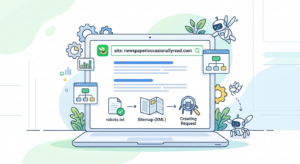
Will Your Site Appear Immediately Upon Registration?
There is a fundamental concept you must understand first.
Simply registering your site with Naver Search Advisor does not mean every post on your site will instantly pop up in search results.
Naver Search operates through multiple stages: the search crawler collects web pages, analyzes the gathered documents, indexes them for search usage, and finally structures the results according to search queries.
Therefore, site registration should be viewed correctly as the starting point for search visibility, not the final destination.
What is Naver Search Advisor?
Naver Search Advisor is a dedicated service provided for website owners to inspect and manage site health regarding Naver Search.
For WordPress administrators, it is essential because it allows you to verify whether Naver’s search crawler can access your site without technical issues.
By registering your site and completing ownership verification, you build a solid foundation to monitor communication and status between search engines and your site, moving far beyond simply “adding a blog to Naver.”
Step 1: Site Ownership Verification
First, register your WordPress site within Naver Search Advisor.
During this step, you must prove that you are the legitimate administrator of the site.
Ownership verification is crucial because it permits website owners to manage search-related performance and data for their specific domain.
On WordPress, you can complete ownership verification using methods suited to your environment, such as uploading an HTML file or adding a meta tag.
Step 2: Checking robots.txt
Following site registration, the next critical component to audit is the robots.txt file.
The robots.txt file acts as an instruction manual for search crawlers, specifying which sections of your site they are allowed or forbidden to crawl.
Naver’s designated search crawler is named Yeti.
However, a common misconception exists here: many believe that to allow Naver’s crawler, you must explicitly include User-agent: Yeti inside robots.txt.
In reality, using User-agent: * to grant access to all search crawlers is entirely sufficient. Naver’s official documentation also notes that you can allow crawl access to all robots universally or specify individual crawlers.
If you wish to block search engine access to your WordPress admin directory while allowing standard public content, you can utilize a structure like this:
Plaintext
User-agent: *
Disallow: /wp-admin/
Allow: /wp-admin/admin-ajax.php

Sitemap: https://newspaperioccasionallyread.com/sitemap.xml
Here, /wp-admin/ represents the internal WordPress management dashboard.
Since standard visitors do not need to discover administrative pages via search results, crawler access to this folder is restricted.
Conversely, if you accidentally block access to general content areas where public articles and pages reside, search engines will fail to collect your content properly.
Step 3: XML Sitemap
A sitemap is a specialized file that helps search engines map out all valid URLs existing across your website.
On WordPress, SEO plugins are commonly configured to automatically generate an XML sitemap.
Once you confirm your sitemap URL, you can submit it directly inside Naver Search Advisor.
It is also recommended to declare your sitemap path inside robots.txt, as shown below:
Plaintext
Sitemap: https://newspaperioccasionallyread.com/sitemap.xml
However, submitting a sitemap does not guarantee that every single page will be automatically listed in search results.
A sitemap serves purely as a structural guide to help search engines understand your domain’s URL hierarchy, rather than a guaranteed registry for immediate search exposure.
Step 4: Requesting Individual Page Crawling
After publishing a new post, you can manually issue a crawl request for that specific URL within Naver Search Advisor.
This function is particularly helpful for newly created websites.
However, clicking the crawl request button should never be interpreted as “Naver will put this post into search results right away.”
Naver explicitly clarifies that crawl requests are not processed instantaneously; the crawler processes them systematically while evaluating site priorities. In practice, processing can take anywhere from a single day to several weeks.
How Do Crawling and Indexing Differ?
Understanding this distinction makes diagnosing Naver search exposure issues considerably easier.
Crawling is the initial process where search robots visit a web page to extract and collect its content.
Indexing is the subsequent process where the search engine analyzes, processes, and catalogs that collected content so it can be retrieved during user searches.
Therefore, crawling and indexing are distinct operations.
Even if a search robot visits your page, it will not appear in search results immediately.
Naver’s search architecture naturally flows through consecutive stages: crawling, processing/filtering, indexing, and ranking.
Step 5: Verifying Indexing Status
After registering your site and issuing crawl requests, you must monitor your indexing status.
For instance, if Search Advisor displays the number of indexed documents as 0, it signifies that no pages are currently cataloged for active search retrieval.
In this situation, you should not immediately assume that “Naver has blocked my website.”
If your site is new, it is far more likely that search robots haven’t visited frequently enough yet, or that collected documents are still queued prior to final indexing.
How to Check Directly in Naver Search
One of the simplest diagnostic methods is running a site: search operator.
For example, if your domain is newspaperioccasionallyread.com, you can type the following into Naver’s search bar:
site:newspaperioccasionallyread.com
If search results appear, it confirms that pages from your domain are active within Naver’s search database.
On the other hand, if zero results return, it indicates that indexing has not occurred yet, or that technical issues are blocking your site’s search visibility.
However, you should not rely solely on the site: search command to evaluate overall index health.
For a precise diagnosis, combine this check with URL Inspection and Site Diagnostics tools inside Naver Search Advisor.
Additional WordPress Settings to Double-Check
Verifying Naver settings alone is not enough; WordPress itself may be configured to block search engines.
Key settings to audit include:
WordPress “Discourage search engines from indexing this site” setting
noindexconfigurations inside your SEO pluginrobots.txtconfigurationCanonical URL settings on individual pages
Server errors
Connection or uptime failures
Incorrect redirection rules
Sitemap errors
The noindex tag requires special attention.
If a page is tagged with noindex, search engine robots will decline to add that page to search results even if they successfully visit and read it.
Configuring Site Descriptions
You can define your site title and global site description in WordPress settings.
If you use SEO plugins like Rank Math, you can easily control site-level Meta Titles and Descriptions.
For example, a multi-topic information site might use a description like:
“A comprehensive informational blog covering diverse topics in depth, including news, economy, IT, daily life, and travel.”
However, adding a detailed site description will not automatically boost your search rankings.
Its core purpose is to help both search engines and human visitors quickly grasp what topics your site covers.
Naver Search Optimization Requires Ongoing Management
Optimizing a WordPress site for Naver Search is an ongoing maintenance routine rather than a one-time setup.
Whenever you publish new content, you can request manual crawling, and if errors are flagged in site diagnostics, they must be resolved promptly.
Additionally, if your URL structure changes or if you switch SEO plugins, you should recheck your robots.txt and sitemap files.
Final Checklist
When preparing a WordPress site for Naver search exposure, review items in this exact sequence:
Register site in Naver Search Advisor
Complete site ownership verification
Verify
robots.txtconfigurationEnsure access is allowed for Naver search crawlers
Generate XML sitemap
Submit XML sitemap
Request URL crawling for new posts
Perform URL inspection
Verify indexing status
Execute
site:domainsearchCheck for unintended
noindexsettings in WordPressAudit site access and server health
Conclusion
The key to exposing a WordPress blog on Naver Search is not merely submitting your site URL.
The essential goal is establishing a robust structure that allows Naver’s search crawler to discover, access, collect, and index your URLs cleanly.
Consequently, robots.txt, sitemaps, and crawl requests perform distinct, complementary roles.
Even if a post fails to rank immediately after requesting a crawl, do not assume your configuration failed. Crawling and indexing are separate stages, and as Naver officially notes, processing takes time.
If you plan to operate a WordPress site over the long haul, maintaining a clean site architecture, publishing quality content consistently, and routinely auditing search status matters far more than the initial registration.
At present, Naver grants almost no exposure to blogs outside its own ecosystem.
However, there is hope that such policies will eventually change.
Ultimately, content generated within Naver will increasingly be written by AI.
Consequently, Naver is already losing ground to Google in search. Because the compensation structure is weak, it is difficult for high-quality, sincere content to be created and posted there organically.
As AI content becomes rampant, affiliate marketing models that used to generate income on Naver are also gradually disappearing.
In the end, platforms require content backed by strong monetization incentives to survive—the prime example being content backed by Google AdSense.