As you use GeneratePress for free, Premium eventually catches your eye at some point.
While the free version is also fast and clean, you get curious about what changes when you purchase the paid version, and whether it is actually worth paying money for blog operation.
To state the conclusion first, if it is a general informational or news-style blog, you can operate it sufficiently with just the free version.
Rather than being a version essential for basic site operation, Premium is closer to an extension feature for configuring and managing the site more granularly.
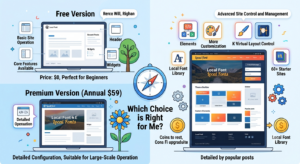
What You Can Do with the Free Version of GeneratePress
Even in free GeneratePress, you can use the core features necessary for basic WordPress site operation.
Representatively, you can configure:
Basic site layout Header Menu Content Sidebar Widget Footer Basic design settings
and so on.
Therefore, there is no problem in creating a general blog itself.
What Does Premium Add?
Currently, on the official GeneratePress pricing page, GP Premium is sold for $59 annually. The official page guides that Premium includes over 60 Starter Sites, a local font library, Theme Builder, various customization features, and more.
In other words, the core of Premium is not simply being a “faster theme.”
Providing more design and site control features is the core.
Why Elements Matter
One of the particularly important features in GeneratePress Premium is Elements.
By using Elements, you can structure your site in a way that controls specific parts of the site according to specific conditions.
For example, advanced control is possible, such as applying a different layout only to a specific category or displaying content at a specific location.
Even in the official documentation, it explains that you can apply a different sidebar layout to specific categories using Premium’s Layout Element.
If your site requires these features, the value of Premium increases.
However, What About a General Blog?
While running a personal blog or a news/informational blog, if you only need:
Writing posts Category operation Search feature Recent posts Sidebar Basic ads Basic menu
about this much, the free version can be sufficient.
If your site is actually running well, there is no need to purchase simply for the reason that “Premium is a better theme.”
Should You Buy Premium for Speed?
You need to think about this part by separating it.
GeneratePress itself is provided as a lightweight theme even in the free version. The official theme page also emphasizes speed, stability, and accessibility as core features.
Therefore, you should not understand it as a structure like:
Free GeneratePress → Slow
Premium → Very fast
Site speed is jointly affected by the plugins used, images, ads, server, cache, etc.
What Is the Current Price?
Based on the current official price, GP Premium is
$59 annually
.
GeneratePress One is
$149 annually
, and is a bundle that includes GP Premium, GenerateBlocks Pro, GenerateCloud, etc.
Therefore, if you operate a simple blog, there is almost no need to go as far as the $149 full bundle.
Who Is Premium Suitable For?
In the following cases, Premium is worth considering.
First, when operating multiple sites professionally
If you create and manage multiple sites, features that reduce repetitive design work are useful.
Second, when you need to granularly control the site structure
If you need to apply different layouts by category or display elements according to specific conditions, the value of Premium increases.
Third, when you want to granularly configure the design yourself
If the basic design settings of the free version are not enough, the additional features of Premium can be convenient.
Fourth, when you want to utilize Starter Sites, etc.
If taking a finished structure and modifying it is more comfortable than creating all designs from scratch by yourself, Premium can save time.
Conversely, Cases Where the Free Version Is Suitable
For the following sites, it is good to start with the free version first.
Personal blog News/informational blog AdSense blog Content-centered site Site with simple design When operating only one site When you want to minimize costs
In these sites, there may not be many occasions to actually use Premium’s features.
You Can Upgrade After You Start Making Money
The biggest advantage of the free version is that you can try running it first.
Without paying costs from the beginning, you can check what features you actually need after creating the site.
For example, while operating a blog, if demands arise such as:
“I want to apply a different layout only to a specific category.”
“I want to automatically insert ads or content at a specific location.”
“I want to control the design more granularly.”
you can purchase Premium then.
Conclusion
GeneratePress Premium is a good product, but using free GeneratePress does not mean problems will occur in blog operation.
Especially for news/informational blogs where speed is important and operations are content-centered, you can sufficiently use it starting from the free version.
Since the current official price for GP Premium is $59 annually, it is reasonable to purchase at the moment you actually need the Premium features.
If you, like me, tested various themes directly and liked GeneratePress’s speed and simple structure, operating the site with the free version first while confirming actual necessity is the least burdensome method.
The core is to decide based not on whether you can make money with the free version, but on whether Premium’s additional features are actually necessary for your current site.